

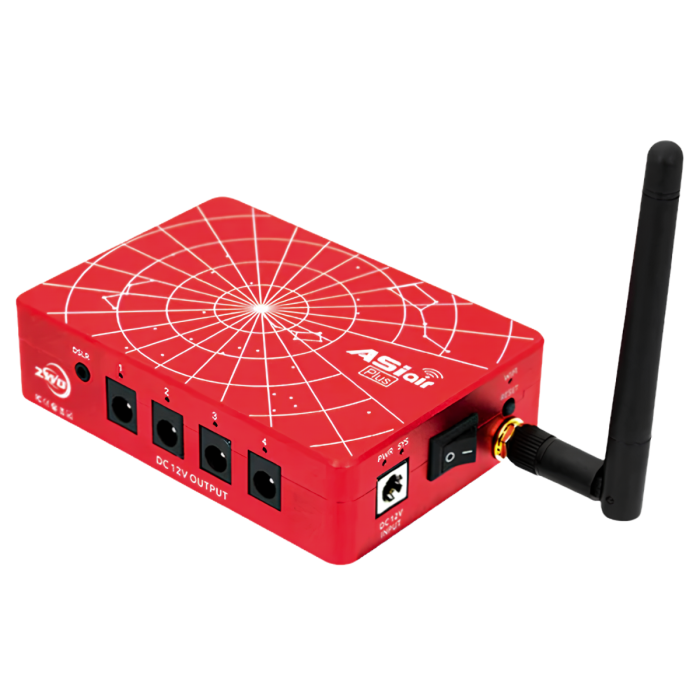
ZWO ASIAIR Plus 256GB Wi-Fi Smart Camera Controller
Stock count is accurate & shown in real time.
- This item is out of stock.
- Sign up for back-in-stock alerts to be notified when this item becomes available (account login required).
- This item is out of stock.
- Sign up for back-in-stock alerts to be notified when this item becomes available (account login required).
Contiguous US / Lower 48:
Free shipping applies to orders over $50 using our chosen carrier/method. Faster paid options are available at checkout.
Alaska, Hawaii & US Territories:
Free shipping applies to many—but not all—products. Enter your ZIP code in cart or upon checkout to confirm options and costs.
International:
International orders do not qualify for free shipping. Shipping, duties, brokerage, tariffs, and taxes are the customer’s responsibility. Some items may be restricted due to export, size, or manufacturer limitations.
- Wirelessly control and automate astrophotography sessions from your phone or tablet
- Controls compatible ZWO cameras, mounts, focusers, filter wheels, and other accessories
- Handles polar alignment, plate solving, autoguiding, autofocus, live stacking, and imaging plans
- Integrated 12V power outputs help simplify cable management
- Bluetooth support for compatible ZWO mounts and EAF focusers
- 256GB high-speed internal eMMC storage
- Beginner-friendly app with guided setup and controls
- Requires a 12V DC power supply (not included)
ZWO ASIAIR Plus: All-in-One Telescope Control
Take control of your astrophotography setup with the ZWO ASIAIR Plus, a compact app-based computer that replaces the need for a field laptop. It brings polar alignment, plate solving, autoguiding, live stacking, camera control, focusing, and power management into one streamlined system.
Built for the ZWO ecosystem, the ASIAIR Plus can power cameras, focusers, dew heaters, and other accessories through integrated 12V outputs, while built-in Bluetooth supports wireless pairing with compatible ZWO AM mounts and EAF focusers. Fast eMMC storage and simple mobile control help keep your imaging rig cleaner, easier to manage, and more reliable in the field.
See the ZWO ASIAIR Plus in Action
In this video, we take a closer look at the ZWO ASIAIR Plus and how it can simplify an astrophotography setup! See how the ASIAIR brings control of your camera, mount, guiding, focusing, and imaging workflow together in one easy-to-use system controlled from your phone or tablet.
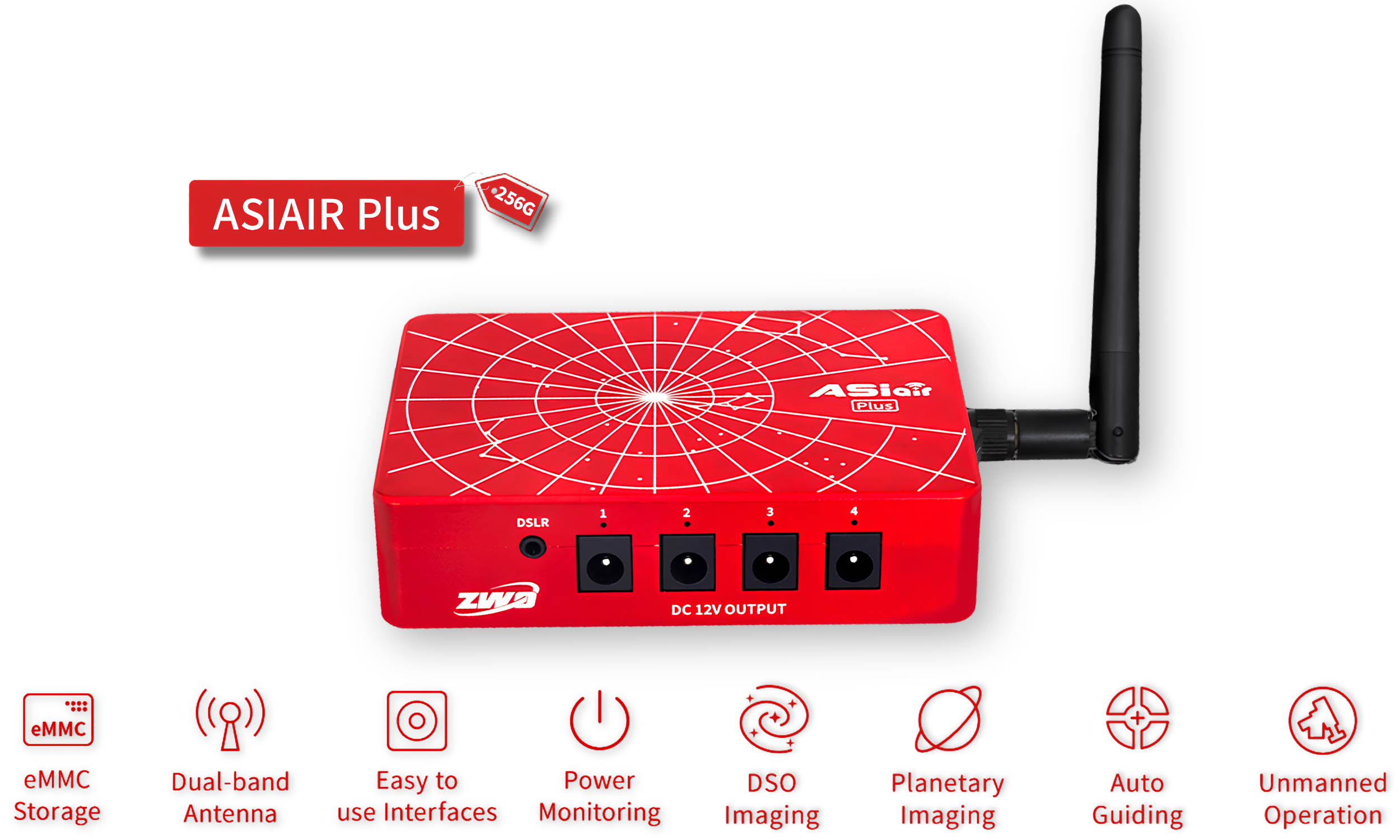
ZWO ASIAIR Plus Highlights
Ultra-Portable & Compact
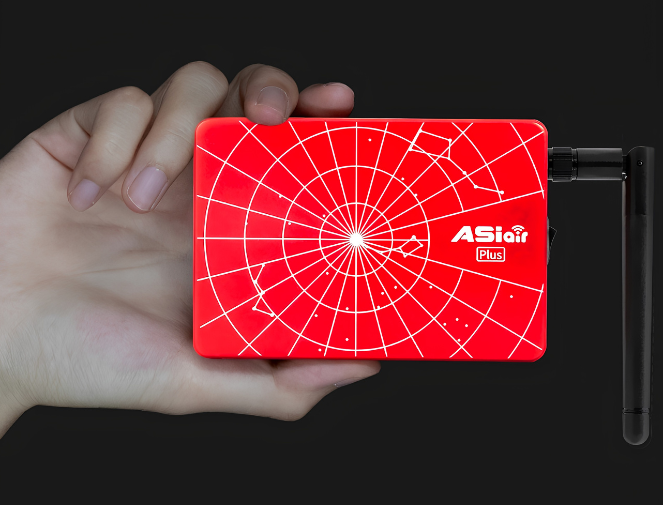
The ASIAIR Plus is incredibly compact and lightweight, measuring just 102 x 70 x 26.5 millimeters and weighing only 0.5 lb (228 grams).
It’s 24% thinner and 13% lighter than the previous ASIAIR Pro, making it easier than ever to take it anywhere your telescope goes.
256GB Internal Storage
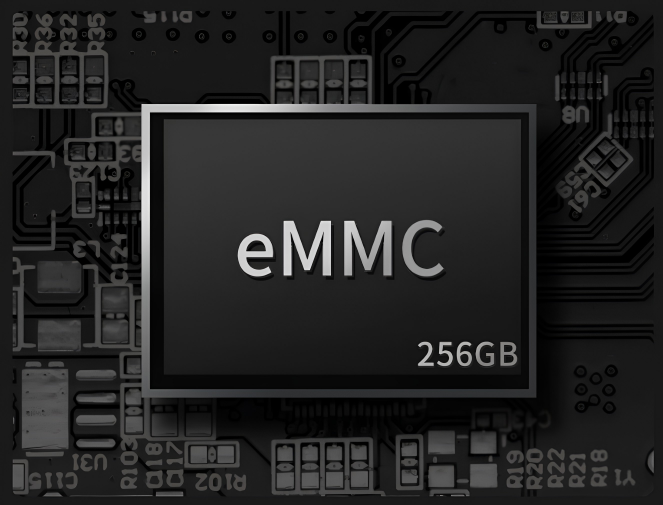
The ASIAIR Plus features 256GB of onboard eMMC storage, giving you plenty of space to save multiple nights of imaging before needing to offload data to your computer.
It also includes a built-in Recovery Mode that automatically detects faults and restores the system if the ASIAIR Plus ever fails to boot, keeping your images protected.
Strong WiFi Antenna
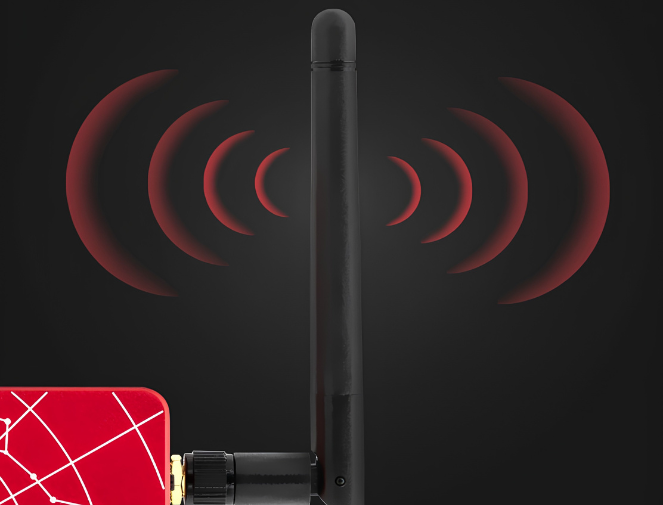
The upgraded WiFi antenna enables a strong connection from up to 65 feet away (20 meters). Image from the comfort of your home or car while your telescope captures the cosmos!
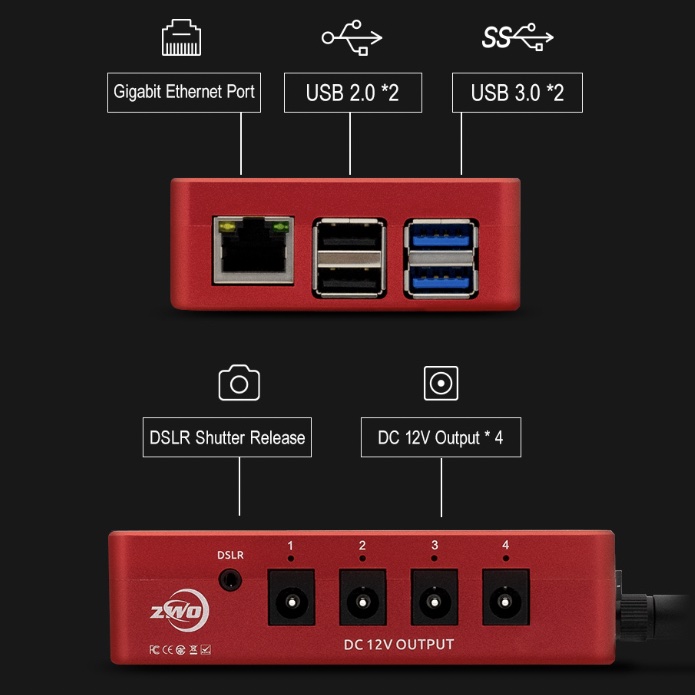
Ultimate Connectivity for Astrophotography
With multiple USB ports, a dedicated DSLR control port, and four 12V power outputs, the ASIAIR Plus lets you connect and control nearly every device in your imaging rig! From cameras and mounts to focusers, filter wheels, and dew heaters, using a single compact hub.
Additionally, the ASIAIR Plus features built-in Bluetooth capability, allowing you to seamlessly connect wirelessly to specific ZWO products—such as the Electronic Automatic Focuser (EAF) and AM series mounts—for an even cleaner, cable-free astrophotography setup!
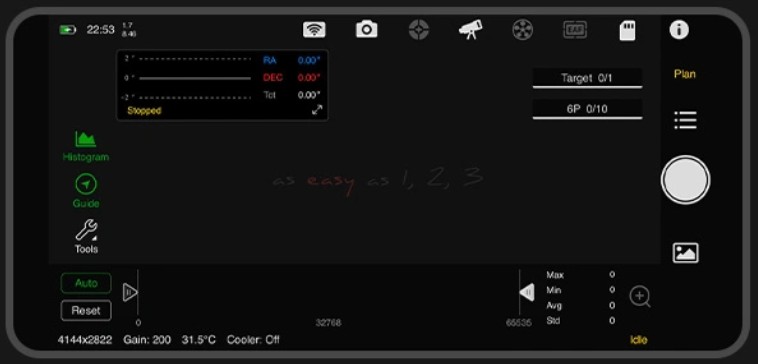
Advanced Control Made Easy
The ASIAIR Plus combines powerful automation with user-friendly controls, making astrophotography easier and more efficient. It handles complex tasks like polar alignment, plate solving, guiding, and autofocus with precision. This means you spend less time fiddling with gear and more time capturing the night sky!
Paired with the intuitive ASIAIR app (available for both iOS and Android), your phone or tablet becomes a full-featured control center. Firmware updates are easy, too—just tap to install right in the app. No cables or complicated downloads required.
When your imaging session is done, the ASIAIR Plus can automatically return your mount to its home position and power itself down—no need to stay up late babysitting your gear!
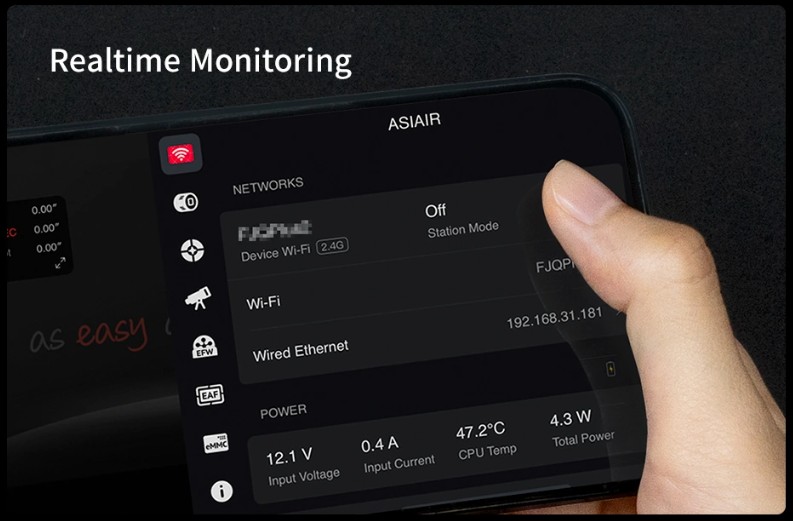
Monitor All Your Gear in Real Time
The ZWO ASIAIR Plus gives you real-time monitoring of your entire imaging setup. You can view live image downloads, check guiding performance, adjust focus, and control your mount, camera, filter wheel, and more! This allows you to catch issues fast and make adjustments on the fly. With the ASIAIR Plus, you will spend less time troubleshooting and more time capturing data.

Plan Your Shots with the Built-In Sky Atlas
The ASIAIR Plus includes a powerful sky atlas—an interactive, real-time star map that displays what’s visible in the night sky from your location. It overlays your telescope and camera’s field of view directly onto the map, allowing you to preview your framing before moving your scope. It takes the guesswork out of framing, so you can plan and capture better-aligned, better-framed shots every time.
Behind the sky atlas is a fully searchable object database, packed with celestial catalogs including the Messier, NGC, and Sharpless objects. You can filter targets by catalog, object type, or pick from a list of the best objects visible tonight based on your exact time and location. Once you’ve selected a target, simply tap “Go” and the ASIAIR will automatically slew and center your mount—no manual entry or guesswork needed.
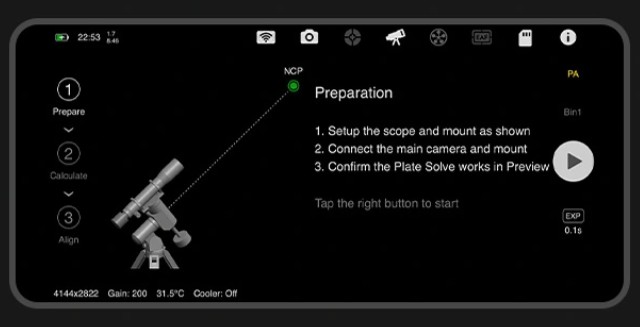
Effortless Polar Alignment
he ZWO ASIAIR Plus makes polar alignment fast, easy, and accurate—even if you’ve never done it before. Using your main imaging camera, the app guides you through a step-by-step polar alignment process that caters to both the northern and southern hemispheres. No additional tools or polar scopes needed.
Here’s how it works: the ASIAIR Plus captures an image using your main camera and plate solves it to determine exactly where your telescope is pointing in the night sky based on the stars in that image. It then automatically rotates the mount’s right ascension (RA) axis by 60 degrees, takes a second image, and plate solves again. By comparing the two images, it accurately calculates your polar alignment error. Next, the app guides you step-by-step as you use your mount's altitude and azimuth bolts to adjust its position to achieve precise alignment.
You don’t even need a clear view of your celestial pole. The ASIAIR can polar align from up to 30 degrees away from the pole, making it ideal for obstructed backyards.
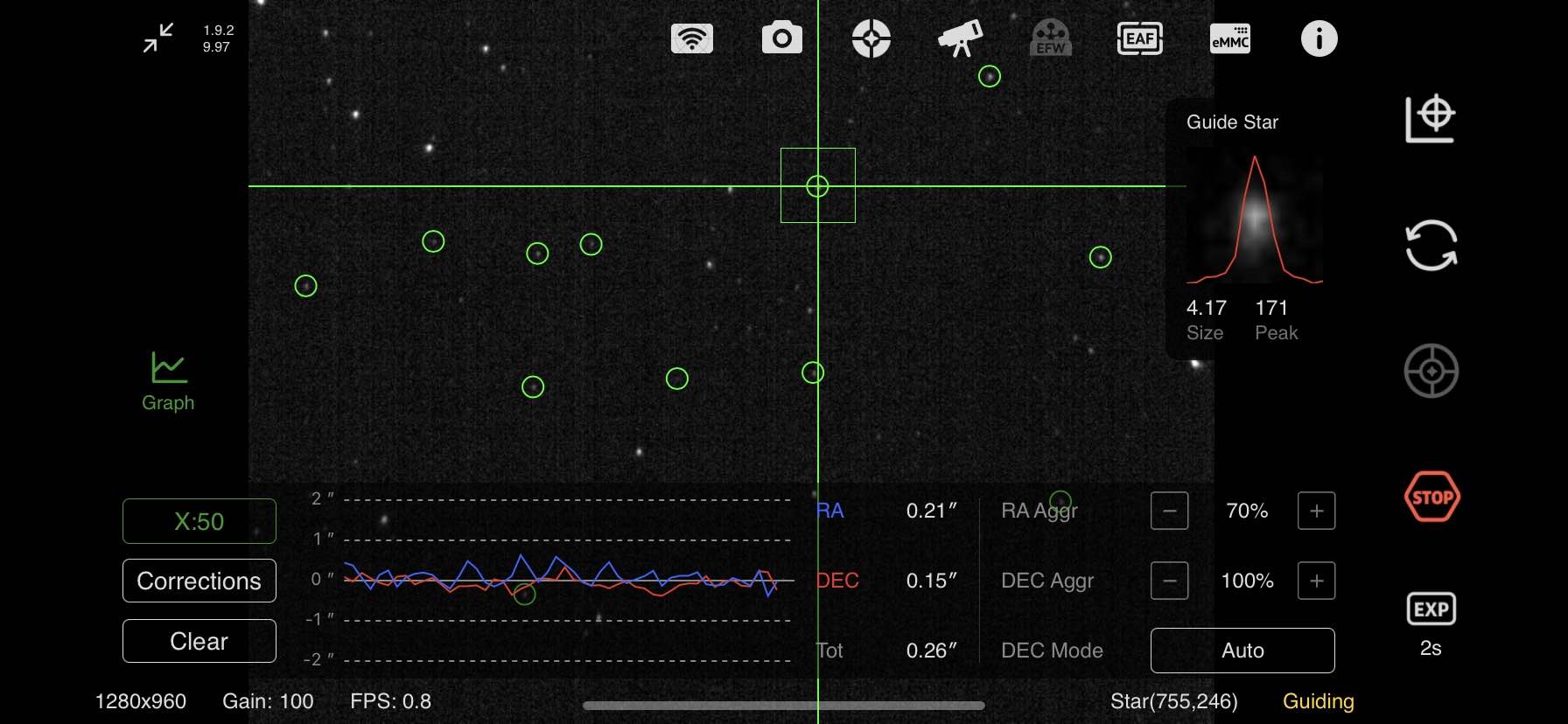
Integrated Autoguiding with Advanced Features
If you're used to PHD2, you'll feel right at home with the ASIAIR Plus. Its built-in guiding system includes many of the same powerful features, except built right into ZWO’s own ASIAIR app. You get a live mini guiding graph always visible on the main imaging screen, so you can monitor performance in real time while capturing data. Dithering between sub-exposures is fully automated, helping reduce noise and improve image quality.
For those who like to fine-tune their results, the ASIAIR lets you adjust advanced guiding parameters like RA and Dec aggression, calibration steps, and more.

Precise Focus with ZWO’s Electronic Automatic Focuser
If you own a ZWO Electronic Automatic Focuser (EAF), the ASIAIR Plus lets you fully automate focusing through the ASIAIR app. It works by moving the focuser in and out while capturing images to create a V-curve. This curve helps the ASIAIR calculate the sharpest focus point with pinpoint accuracy, so your telescope delivers crisp, clear images every time.
The app also lets you adjust advanced autofocus settings like micron step size and backlash compensation. This gives you full control over the focuser’s movement, allowing you to match your equipment perfectly. This level of control helps reduce focus hunting, which once again saves you time!
Note: The ASIAIR Plus currently supports only ZWO’s EAF units. It is not compatible with third-party autofocusers.
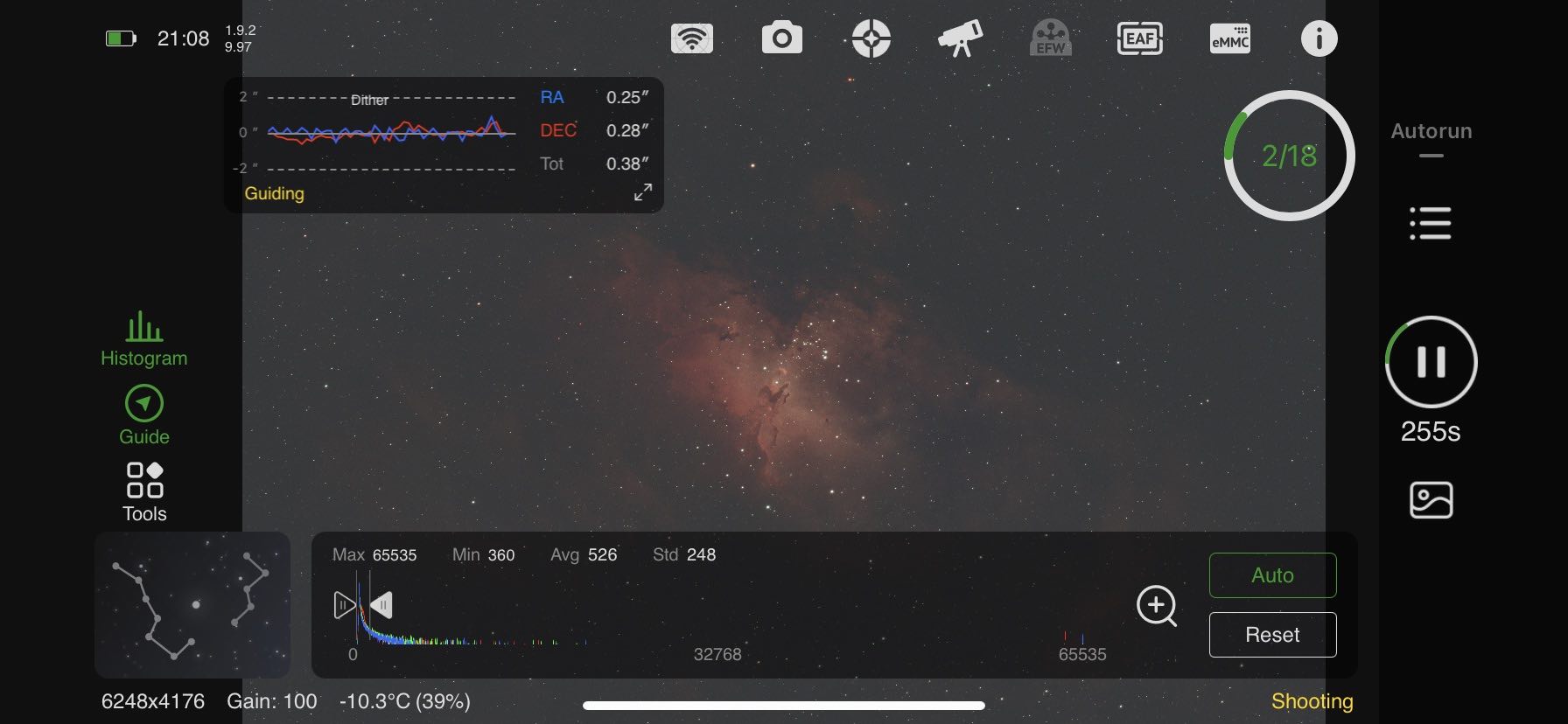
Intelligent Capturing Modes
The ZWO ASIAIR Plus offers four smart capture modes to simplify your astrophotography.
With Autorun and Plan, you simply set it up and let it run. Autorun completes a full imaging sequence with automatic filter changes and meridian flips, while Plan manages multiple targets in one night, handling slewing, focusing, guiding, and imaging all on its own.
Live mode stacks images in real time, and Video mode captures high-frame-rate clips with selectable regions of interest for planetary and lunar imaging. The ASIAIR app makes capturing stunning astrophotography effortless, giving you more time to enjoy the night sky.
Frequently Asked Questions About the ASIAIR Plus
What are the System Requirements for ASIAIR Plus?
Minimum System Requirements
for Running ASIAIR
ASIAIR runs on iOS and Android devices. For the best experience, please confirm that your phones or tablets meet the requirements below before purchase.
| OS Version | Phone | iPad/Tablet | |
|---|---|---|---|
| iOS/iPadOS | 12 and up | iPhone 6s and later | iPad/iPad Mini/iPad Air/iPad Pro |
| Android | 9 and up | All Android phones, RAM ≥ 4GB | Tablets with Android OS, RAM ≥ 4GB |
How do you power the ASIAIR Plus?
The ASIAIR Plus requires an 11V–15V DC power source with a 5.5x2.1mm plug. ZWO recommends a 12V/5A power supply, especially if you plan to power other equipment through the ASIAIR.
Its four 12V output ports can supply up to 3A each, with a maximum combined output of 6A. ZWO's AC adapter is sold separately, or you can use a compatible field battery or other regulated DC power source.
What is the WiFi range of the ASIAIR Plus?
The ASIAIR Plus uses an external WiFi antenna and can provide a wireless range of up to about 65 feet (20 meters) under ideal, open conditions. Actual range will vary depending on walls, interference, antenna position, and other environmental factors.
This makes it possible to operate your imaging rig remotely from a nearby vehicle, tent, or indoors when conditions allow.
How much storage does the ASIAIR Plus have?
This version includes 256GB of built-in eMMC storage, providing plenty of space for most imaging sessions without requiring a separate drive.
For additional storage, the ASIAIR Plus supports compatible USB flash drives and external drives up to 1TB. Supported formats include NTFS, FAT32, and exFAT.
How do you transfer images from the ASIAIR Plus to a computer?
For fast transfers, connect the ASIAIR Plus directly to your computer using its USB-C data port and a USB-C to USB-A cable. The internal storage will appear as an external drive, allowing you to copy files directly.
You can also transfer files using a USB flash drive or over your network using WiFi or Ethernet.
Does the ASIAIR app work on Mac or PC?
The ASIAIR app is primarily designed for iOS and Android phones and tablets. It can also run on compatible Macs with Apple Silicon.
There is currently no native Windows version of the ASIAIR app. Windows users can run the Android version through an emulator such as BlueStacks, although this is not the primary supported way to use the system.
What equipment is compatible with the ASIAIR Plus?
The ASIAIR Plus is designed primarily around the ZWO ecosystem and supports compatible ZWO astronomy cameras, guide cameras, EAF focusers, electronic filter wheels, and AM-series mounts.
It also supports many third-party telescope mounts and select Canon, Nikon, and Sony DSLR/mirrorless cameras. Compatibility varies by model, so check ZWO's current compatibility list before purchasing if you plan to use non-ZWO equipment.
Does the ASIAIR Plus require an internet connection?
An internet connection is required for initial activation and certain online features, but you do not need internet access simply to operate your imaging rig in the field. Your phone or tablet can connect directly to the ASIAIR Plus over its own WiFi network.
You can also use Station Mode to connect the ASIAIR Plus to an existing WiFi network when one is available.
How do you attach the ASIAIR Plus to your telescope or mount?
The ASIAIR Plus includes mounting provisions that make it easy to attach to your imaging rig using a compatible finder shoe or dovetail-style bracket. It also provides M4 and 1/4"-20 mounting points for other mounting configurations.
Mounting the ASIAIR to the telescope itself is often convenient because cameras, focusers, filter wheels, and other accessories move together with the OTA, helping keep cable runs short and organized.
Additional Info
Specifications
- Internal Storage: 256GB eMMC (Approx. 244GB Usable)
- Dimensions: 102mm Long x 70mm Wide x 26.5mm High
- Weight: 241g (0.53 lbs)
- Wi-Fi: Dual-Band With External Antenna; Range Up to ~20m
- 1x 12V 5A DC 5.5x2.1mm Power Input Port With Indicator Light
- 4x 12V 3A DC 5.5x2.1mm Power Output Ports With Power Indicator Lights
- 2x USB 2.0 Ports
- 2x USB 3.0 Ports
- 1x USB-C Port
- 1x Gigabit Ethernet Port
- 1x DSLR SNAP Shutter Release Cable Port
- 1x Coaxial Port for Connecting the Wi-Fi Antenna (Included)
- On/Off Switch
- Compatibility: ZWO Cameras, EAF, and Filter Wheels. Select Canon/Nikon/Sony DSLRs, and a Large Range of Equatorial Mounts.
Other Information
- Country of Manufacture: China
ZWO ASIAIR Plus: All-in-One Telescope Control
Take control of your astrophotography setup with the ZWO ASIAIR Plus, a compact app-based computer that replaces the need for a field laptop. It brings polar alignment, plate solving, autoguiding, live stacking, camera control, focusing, and power management into one streamlined system.
Built for the ZWO ecosystem, the ASIAIR Plus can power cameras, focusers, dew heaters, and other accessories through integrated 12V outputs, while built-in Bluetooth supports wireless pairing with compatible ZWO AM mounts and EAF focusers. Fast eMMC storage and simple mobile control help keep your imaging rig cleaner, easier to manage, and more reliable in the field.
See the ZWO ASIAIR Plus in Action
In this video, we take a closer look at the ZWO ASIAIR Plus and how it can simplify an astrophotography setup! See how the ASIAIR brings control of your camera, mount, guiding, focusing, and imaging workflow together in one easy-to-use system controlled from your phone or tablet.
ZWO ASIAIR Plus Highlights
Ultra-Portable & Compact
The ASIAIR Plus is incredibly compact and lightweight, measuring just 102 x 70 x 26.5 millimeters and weighing only 0.5 lb (228 grams).
It’s 24% thinner and 13% lighter than the previous ASIAIR Pro, making it easier than ever to take it anywhere your telescope goes.
256GB Internal Storage
The ASIAIR Plus features 256GB of onboard eMMC storage, giving you plenty of space to save multiple nights of imaging before needing to offload data to your computer.
It also includes a built-in Recovery Mode that automatically detects faults and restores the system if the ASIAIR Plus ever fails to boot, keeping your images protected.
Strong WiFi Antenna
The upgraded WiFi antenna enables a strong connection from up to 65 feet away (20 meters). Image from the comfort of your home or car while your telescope captures the cosmos!
Ultimate Connectivity for Astrophotography
With multiple USB ports, a dedicated DSLR control port, and four 12V power outputs, the ASIAIR Plus lets you connect and control nearly every device in your imaging rig! From cameras and mounts to focusers, filter wheels, and dew heaters, using a single compact hub.
Additionally, the ASIAIR Plus features built-in Bluetooth capability, allowing you to seamlessly connect wirelessly to specific ZWO products—such as the Electronic Automatic Focuser (EAF) and AM series mounts—for an even cleaner, cable-free astrophotography setup!
Advanced Control Made Easy
The ASIAIR Plus combines powerful automation with user-friendly controls, making astrophotography easier and more efficient. It handles complex tasks like polar alignment, plate solving, guiding, and autofocus with precision. This means you spend less time fiddling with gear and more time capturing the night sky!
Paired with the intuitive ASIAIR app (available for both iOS and Android), your phone or tablet becomes a full-featured control center. Firmware updates are easy, too—just tap to install right in the app. No cables or complicated downloads required.
When your imaging session is done, the ASIAIR Plus can automatically return your mount to its home position and power itself down—no need to stay up late babysitting your gear!
Monitor All Your Gear in Real Time
The ZWO ASIAIR Plus gives you real-time monitoring of your entire imaging setup. You can view live image downloads, check guiding performance, adjust focus, and control your mount, camera, filter wheel, and more! This allows you to catch issues fast and make adjustments on the fly. With the ASIAIR Plus, you will spend less time troubleshooting and more time capturing data.
Plan Your Shots with the Built-In Sky Atlas
The ASIAIR Plus includes a powerful sky atlas—an interactive, real-time star map that displays what’s visible in the night sky from your location. It overlays your telescope and camera’s field of view directly onto the map, allowing you to preview your framing before moving your scope. It takes the guesswork out of framing, so you can plan and capture better-aligned, better-framed shots every time.
Behind the sky atlas is a fully searchable object database, packed with celestial catalogs including the Messier, NGC, and Sharpless objects. You can filter targets by catalog, object type, or pick from a list of the best objects visible tonight based on your exact time and location. Once you’ve selected a target, simply tap “Go” and the ASIAIR will automatically slew and center your mount—no manual entry or guesswork needed.
Effortless Polar Alignment
he ZWO ASIAIR Plus makes polar alignment fast, easy, and accurate—even if you’ve never done it before. Using your main imaging camera, the app guides you through a step-by-step polar alignment process that caters to both the northern and southern hemispheres. No additional tools or polar scopes needed.
Here’s how it works: the ASIAIR Plus captures an image using your main camera and plate solves it to determine exactly where your telescope is pointing in the night sky based on the stars in that image. It then automatically rotates the mount’s right ascension (RA) axis by 60 degrees, takes a second image, and plate solves again. By comparing the two images, it accurately calculates your polar alignment error. Next, the app guides you step-by-step as you use your mount's altitude and azimuth bolts to adjust its position to achieve precise alignment.
You don’t even need a clear view of your celestial pole. The ASIAIR can polar align from up to 30 degrees away from the pole, making it ideal for obstructed backyards.
Integrated Autoguiding with Advanced Features
If you're used to PHD2, you'll feel right at home with the ASIAIR Plus. Its built-in guiding system includes many of the same powerful features, except built right into ZWO’s own ASIAIR app. You get a live mini guiding graph always visible on the main imaging screen, so you can monitor performance in real time while capturing data. Dithering between sub-exposures is fully automated, helping reduce noise and improve image quality.
For those who like to fine-tune their results, the ASIAIR lets you adjust advanced guiding parameters like RA and Dec aggression, calibration steps, and more.
Precise Focus with ZWO’s Electronic Automatic Focuser
If you own a ZWO Electronic Automatic Focuser (EAF), the ASIAIR Plus lets you fully automate focusing through the ASIAIR app. It works by moving the focuser in and out while capturing images to create a V-curve. This curve helps the ASIAIR calculate the sharpest focus point with pinpoint accuracy, so your telescope delivers crisp, clear images every time.
The app also lets you adjust advanced autofocus settings like micron step size and backlash compensation. This gives you full control over the focuser’s movement, allowing you to match your equipment perfectly. This level of control helps reduce focus hunting, which once again saves you time!
Note: The ASIAIR Plus currently supports only ZWO’s EAF units. It is not compatible with third-party autofocusers.
Intelligent Capturing Modes
The ZWO ASIAIR Plus offers four smart capture modes to simplify your astrophotography.
With Autorun and Plan, you simply set it up and let it run. Autorun completes a full imaging sequence with automatic filter changes and meridian flips, while Plan manages multiple targets in one night, handling slewing, focusing, guiding, and imaging all on its own.
Live mode stacks images in real time, and Video mode captures high-frame-rate clips with selectable regions of interest for planetary and lunar imaging. The ASIAIR app makes capturing stunning astrophotography effortless, giving you more time to enjoy the night sky.
Frequently Asked Questions About the ASIAIR Plus
What are the System Requirements for ASIAIR Plus?
Minimum System Requirements
for Running ASIAIR
ASIAIR runs on iOS and Android devices. For the best experience, please confirm that your phones or tablets meet the requirements below before purchase.
| OS Version | Phone | iPad/Tablet | |
|---|---|---|---|
| iOS/iPadOS | 12 and up | iPhone 6s and later | iPad/iPad Mini/iPad Air/iPad Pro |
| Android | 9 and up | All Android phones, RAM ≥ 4GB | Tablets with Android OS, RAM ≥ 4GB |
How do you power the ASIAIR Plus?
The ASIAIR Plus requires an 11V–15V DC power source with a 5.5x2.1mm plug. ZWO recommends a 12V/5A power supply, especially if you plan to power other equipment through the ASIAIR.
Its four 12V output ports can supply up to 3A each, with a maximum combined output of 6A. ZWO's AC adapter is sold separately, or you can use a compatible field battery or other regulated DC power source.
What is the WiFi range of the ASIAIR Plus?
The ASIAIR Plus uses an external WiFi antenna and can provide a wireless range of up to about 65 feet (20 meters) under ideal, open conditions. Actual range will vary depending on walls, interference, antenna position, and other environmental factors.
This makes it possible to operate your imaging rig remotely from a nearby vehicle, tent, or indoors when conditions allow.
How much storage does the ASIAIR Plus have?
This version includes 256GB of built-in eMMC storage, providing plenty of space for most imaging sessions without requiring a separate drive.
For additional storage, the ASIAIR Plus supports compatible USB flash drives and external drives up to 1TB. Supported formats include NTFS, FAT32, and exFAT.
How do you transfer images from the ASIAIR Plus to a computer?
For fast transfers, connect the ASIAIR Plus directly to your computer using its USB-C data port and a USB-C to USB-A cable. The internal storage will appear as an external drive, allowing you to copy files directly.
You can also transfer files using a USB flash drive or over your network using WiFi or Ethernet.
Does the ASIAIR app work on Mac or PC?
The ASIAIR app is primarily designed for iOS and Android phones and tablets. It can also run on compatible Macs with Apple Silicon.
There is currently no native Windows version of the ASIAIR app. Windows users can run the Android version through an emulator such as BlueStacks, although this is not the primary supported way to use the system.
What equipment is compatible with the ASIAIR Plus?
The ASIAIR Plus is designed primarily around the ZWO ecosystem and supports compatible ZWO astronomy cameras, guide cameras, EAF focusers, electronic filter wheels, and AM-series mounts.
It also supports many third-party telescope mounts and select Canon, Nikon, and Sony DSLR/mirrorless cameras. Compatibility varies by model, so check ZWO's current compatibility list before purchasing if you plan to use non-ZWO equipment.
Does the ASIAIR Plus require an internet connection?
An internet connection is required for initial activation and certain online features, but you do not need internet access simply to operate your imaging rig in the field. Your phone or tablet can connect directly to the ASIAIR Plus over its own WiFi network.
You can also use Station Mode to connect the ASIAIR Plus to an existing WiFi network when one is available.
How do you attach the ASIAIR Plus to your telescope or mount?
The ASIAIR Plus includes mounting provisions that make it easy to attach to your imaging rig using a compatible finder shoe or dovetail-style bracket. It also provides M4 and 1/4"-20 mounting points for other mounting configurations.
Mounting the ASIAIR to the telescope itself is often convenient because cameras, focusers, filter wheels, and other accessories move together with the OTA, helping keep cable runs short and organized.
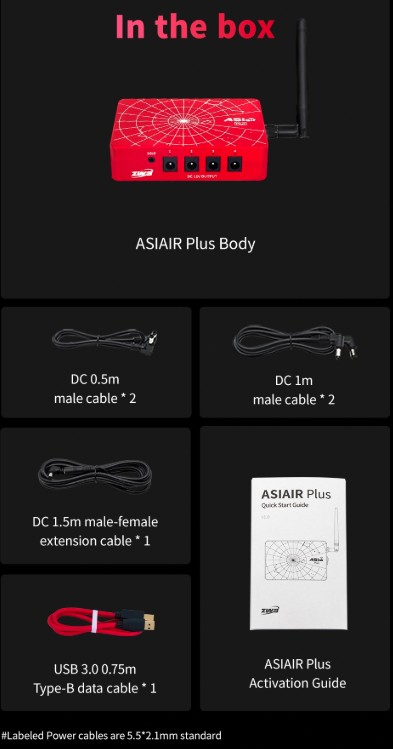
- ASIAIR Plus Body
- 2x DC 0.5m Male Cable
- 2x DC 1m Male Cable
- DC 1.5m Male-Female Extension Cable
- USB 3.0 0.75m Type-B Data Cable
- Quick Start Guide Activation Guide (China)

- Wirelessly control and automate astrophotography sessions from your phone or tablet
- Controls compatible ZWO cameras, mounts, focusers, filter wheels, and other accessories
- Handles polar alignment, plate solving, autoguiding, autofocus, live stacking, and imaging plans
- Integrated 12V power outputs help simplify cable management
- Bluetooth support for compatible ZWO mounts and EAF focusers
- 256GB high-speed internal eMMC storage
- Beginner-friendly app with guided setup and controls
- Requires a 12V DC power supply (not included)
ZWO ASIAIR Plus: All-in-One Telescope Control
Take control of your astrophotography setup with the ZWO ASIAIR Plus, a compact app-based computer that replaces the need for a field laptop. It brings polar alignment, plate solving, autoguiding, live stacking, camera control, focusing, and power management into one streamlined system.
Built for the ZWO ecosystem, the ASIAIR Plus can power cameras, focusers, dew heaters, and other accessories through integrated 12V outputs, while built-in Bluetooth supports wireless pairing with compatible ZWO AM mounts and EAF focusers. Fast eMMC storage and simple mobile control help keep your imaging rig cleaner, easier to manage, and more reliable in the field.
See the ZWO ASIAIR Plus in Action
In this video, we take a closer look at the ZWO ASIAIR Plus and how it can simplify an astrophotography setup! See how the ASIAIR brings control of your camera, mount, guiding, focusing, and imaging workflow together in one easy-to-use system controlled from your phone or tablet.
ZWO ASIAIR Plus Highlights
Ultra-Portable & Compact
The ASIAIR Plus is incredibly compact and lightweight, measuring just 102 x 70 x 26.5 millimeters and weighing only 0.5 lb (228 grams).
It’s 24% thinner and 13% lighter than the previous ASIAIR Pro, making it easier than ever to take it anywhere your telescope goes.
256GB Internal Storage
The ASIAIR Plus features 256GB of onboard eMMC storage, giving you plenty of space to save multiple nights of imaging before needing to offload data to your computer.
It also includes a built-in Recovery Mode that automatically detects faults and restores the system if the ASIAIR Plus ever fails to boot, keeping your images protected.
Strong WiFi Antenna
The upgraded WiFi antenna enables a strong connection from up to 65 feet away (20 meters). Image from the comfort of your home or car while your telescope captures the cosmos!
Ultimate Connectivity for Astrophotography
With multiple USB ports, a dedicated DSLR control port, and four 12V power outputs, the ASIAIR Plus lets you connect and control nearly every device in your imaging rig! From cameras and mounts to focusers, filter wheels, and dew heaters, using a single compact hub.
Additionally, the ASIAIR Plus features built-in Bluetooth capability, allowing you to seamlessly connect wirelessly to specific ZWO products—such as the Electronic Automatic Focuser (EAF) and AM series mounts—for an even cleaner, cable-free astrophotography setup!
Advanced Control Made Easy
The ASIAIR Plus combines powerful automation with user-friendly controls, making astrophotography easier and more efficient. It handles complex tasks like polar alignment, plate solving, guiding, and autofocus with precision. This means you spend less time fiddling with gear and more time capturing the night sky!
Paired with the intuitive ASIAIR app (available for both iOS and Android), your phone or tablet becomes a full-featured control center. Firmware updates are easy, too—just tap to install right in the app. No cables or complicated downloads required.
When your imaging session is done, the ASIAIR Plus can automatically return your mount to its home position and power itself down—no need to stay up late babysitting your gear!
Monitor All Your Gear in Real Time
The ZWO ASIAIR Plus gives you real-time monitoring of your entire imaging setup. You can view live image downloads, check guiding performance, adjust focus, and control your mount, camera, filter wheel, and more! This allows you to catch issues fast and make adjustments on the fly. With the ASIAIR Plus, you will spend less time troubleshooting and more time capturing data.
Plan Your Shots with the Built-In Sky Atlas
The ASIAIR Plus includes a powerful sky atlas—an interactive, real-time star map that displays what’s visible in the night sky from your location. It overlays your telescope and camera’s field of view directly onto the map, allowing you to preview your framing before moving your scope. It takes the guesswork out of framing, so you can plan and capture better-aligned, better-framed shots every time.
Behind the sky atlas is a fully searchable object database, packed with celestial catalogs including the Messier, NGC, and Sharpless objects. You can filter targets by catalog, object type, or pick from a list of the best objects visible tonight based on your exact time and location. Once you’ve selected a target, simply tap “Go” and the ASIAIR will automatically slew and center your mount—no manual entry or guesswork needed.
Effortless Polar Alignment
he ZWO ASIAIR Plus makes polar alignment fast, easy, and accurate—even if you’ve never done it before. Using your main imaging camera, the app guides you through a step-by-step polar alignment process that caters to both the northern and southern hemispheres. No additional tools or polar scopes needed.
Here’s how it works: the ASIAIR Plus captures an image using your main camera and plate solves it to determine exactly where your telescope is pointing in the night sky based on the stars in that image. It then automatically rotates the mount’s right ascension (RA) axis by 60 degrees, takes a second image, and plate solves again. By comparing the two images, it accurately calculates your polar alignment error. Next, the app guides you step-by-step as you use your mount's altitude and azimuth bolts to adjust its position to achieve precise alignment.
You don’t even need a clear view of your celestial pole. The ASIAIR can polar align from up to 30 degrees away from the pole, making it ideal for obstructed backyards.
Integrated Autoguiding with Advanced Features
If you're used to PHD2, you'll feel right at home with the ASIAIR Plus. Its built-in guiding system includes many of the same powerful features, except built right into ZWO’s own ASIAIR app. You get a live mini guiding graph always visible on the main imaging screen, so you can monitor performance in real time while capturing data. Dithering between sub-exposures is fully automated, helping reduce noise and improve image quality.
For those who like to fine-tune their results, the ASIAIR lets you adjust advanced guiding parameters like RA and Dec aggression, calibration steps, and more.
Precise Focus with ZWO’s Electronic Automatic Focuser
If you own a ZWO Electronic Automatic Focuser (EAF), the ASIAIR Plus lets you fully automate focusing through the ASIAIR app. It works by moving the focuser in and out while capturing images to create a V-curve. This curve helps the ASIAIR calculate the sharpest focus point with pinpoint accuracy, so your telescope delivers crisp, clear images every time.
The app also lets you adjust advanced autofocus settings like micron step size and backlash compensation. This gives you full control over the focuser’s movement, allowing you to match your equipment perfectly. This level of control helps reduce focus hunting, which once again saves you time!
Note: The ASIAIR Plus currently supports only ZWO’s EAF units. It is not compatible with third-party autofocusers.
Intelligent Capturing Modes
The ZWO ASIAIR Plus offers four smart capture modes to simplify your astrophotography.
With Autorun and Plan, you simply set it up and let it run. Autorun completes a full imaging sequence with automatic filter changes and meridian flips, while Plan manages multiple targets in one night, handling slewing, focusing, guiding, and imaging all on its own.
Live mode stacks images in real time, and Video mode captures high-frame-rate clips with selectable regions of interest for planetary and lunar imaging. The ASIAIR app makes capturing stunning astrophotography effortless, giving you more time to enjoy the night sky.
Frequently Asked Questions About the ASIAIR Plus
What are the System Requirements for ASIAIR Plus?
Minimum System Requirements
for Running ASIAIR
ASIAIR runs on iOS and Android devices. For the best experience, please confirm that your phones or tablets meet the requirements below before purchase.
| OS Version | Phone | iPad/Tablet | |
|---|---|---|---|
| iOS/iPadOS | 12 and up | iPhone 6s and later | iPad/iPad Mini/iPad Air/iPad Pro |
| Android | 9 and up | All Android phones, RAM ≥ 4GB | Tablets with Android OS, RAM ≥ 4GB |
How do you power the ASIAIR Plus?
The ASIAIR Plus requires an 11V–15V DC power source with a 5.5x2.1mm plug. ZWO recommends a 12V/5A power supply, especially if you plan to power other equipment through the ASIAIR.
Its four 12V output ports can supply up to 3A each, with a maximum combined output of 6A. ZWO's AC adapter is sold separately, or you can use a compatible field battery or other regulated DC power source.
What is the WiFi range of the ASIAIR Plus?
The ASIAIR Plus uses an external WiFi antenna and can provide a wireless range of up to about 65 feet (20 meters) under ideal, open conditions. Actual range will vary depending on walls, interference, antenna position, and other environmental factors.
This makes it possible to operate your imaging rig remotely from a nearby vehicle, tent, or indoors when conditions allow.
How much storage does the ASIAIR Plus have?
This version includes 256GB of built-in eMMC storage, providing plenty of space for most imaging sessions without requiring a separate drive.
For additional storage, the ASIAIR Plus supports compatible USB flash drives and external drives up to 1TB. Supported formats include NTFS, FAT32, and exFAT.
How do you transfer images from the ASIAIR Plus to a computer?
For fast transfers, connect the ASIAIR Plus directly to your computer using its USB-C data port and a USB-C to USB-A cable. The internal storage will appear as an external drive, allowing you to copy files directly.
You can also transfer files using a USB flash drive or over your network using WiFi or Ethernet.
Does the ASIAIR app work on Mac or PC?
The ASIAIR app is primarily designed for iOS and Android phones and tablets. It can also run on compatible Macs with Apple Silicon.
There is currently no native Windows version of the ASIAIR app. Windows users can run the Android version through an emulator such as BlueStacks, although this is not the primary supported way to use the system.
What equipment is compatible with the ASIAIR Plus?
The ASIAIR Plus is designed primarily around the ZWO ecosystem and supports compatible ZWO astronomy cameras, guide cameras, EAF focusers, electronic filter wheels, and AM-series mounts.
It also supports many third-party telescope mounts and select Canon, Nikon, and Sony DSLR/mirrorless cameras. Compatibility varies by model, so check ZWO's current compatibility list before purchasing if you plan to use non-ZWO equipment.
Does the ASIAIR Plus require an internet connection?
An internet connection is required for initial activation and certain online features, but you do not need internet access simply to operate your imaging rig in the field. Your phone or tablet can connect directly to the ASIAIR Plus over its own WiFi network.
You can also use Station Mode to connect the ASIAIR Plus to an existing WiFi network when one is available.
How do you attach the ASIAIR Plus to your telescope or mount?
The ASIAIR Plus includes mounting provisions that make it easy to attach to your imaging rig using a compatible finder shoe or dovetail-style bracket. It also provides M4 and 1/4"-20 mounting points for other mounting configurations.
Mounting the ASIAIR to the telescope itself is often convenient because cameras, focusers, filter wheels, and other accessories move together with the OTA, helping keep cable runs short and organized.
Additional Info
Specifications
- Internal Storage: 256GB eMMC (Approx. 244GB Usable)
- Dimensions: 102mm Long x 70mm Wide x 26.5mm High
- Weight: 241g (0.53 lbs)
- Wi-Fi: Dual-Band With External Antenna; Range Up to ~20m
- 1x 12V 5A DC 5.5x2.1mm Power Input Port With Indicator Light
- 4x 12V 3A DC 5.5x2.1mm Power Output Ports With Power Indicator Lights
- 2x USB 2.0 Ports
- 2x USB 3.0 Ports
- 1x USB-C Port
- 1x Gigabit Ethernet Port
- 1x DSLR SNAP Shutter Release Cable Port
- 1x Coaxial Port for Connecting the Wi-Fi Antenna (Included)
- On/Off Switch
- Compatibility: ZWO Cameras, EAF, and Filter Wheels. Select Canon/Nikon/Sony DSLRs, and a Large Range of Equatorial Mounts.
Other Information
- Country of Manufacture: China
- ASIAIR Plus Body
- 2x DC 0.5m Male Cable
- 2x DC 1m Male Cable
- DC 1.5m Male-Female Extension Cable
- USB 3.0 0.75m Type-B Data Cable
- Quick Start Guide Activation Guide (China)

ZWO ASIAIR Plus 256GB Wi-Fi Smart Camera Controller