

ZWO ASIAIR Wi-Fi Camera Controller for ZWO ASI Cameras
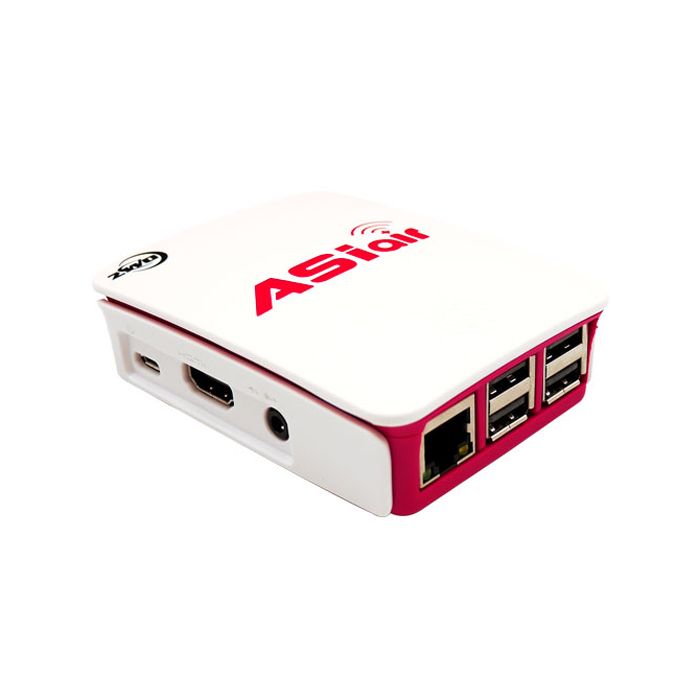
This item is discontinued by the manufacturer and is no longer available.
Stock count is accurate & shown in real time.
- This item is out of stock.
- Sign up for back-in-stock alerts to be notified when this item becomes available (account login required).
- This item is out of stock.
- Sign up for back-in-stock alerts to be notified when this item becomes available (account login required).
This item has been discontinued by ZWO. It has been replaced by the new ASIAir-Pro.
- Control imaging, autoguiding, and GoTo mount with a smart phone or tablet through dual-band WiFi (no computer required)
- Enables control and syncing of SkySafari-compatible mounts with SkySafari app; also allows control of INDI-compatible computerized equatorial mounts
- Works with all ZWO USB3.0, Mini, and cooled cameras
- Includes 32 GB microSD card for storing images, four USB2.0 ports, and micro-USB port for 5V input voltage
- Compatible with iPhone 6, 7, 8, and X and iPad and iPad Pro with iOS 9.0 and later, and with all Android phones and tablets with Android 5.0 and later (requires installation of ASIair app)
Leave your laptop at home! ZWO’s ASIair WiFi device lets you take complete control of your astrophotography sessions with only an iOS or Android smart phone or tablet. Control your ZWO camera, preview and store images, guide, and control and sync your computerized equatorial mount with the tap of the screen, all with the same easy-to-use app. The ASIair greatly simplifies setting up, guiding, and capturing astro-images.
Install the ASIair app on your phone or tablet, slide the microSD storage card into the device, connect your mount and camera, and you’re ready to go. Control the ASIair through its dual-band WiFi network at 2.4GHZ or 5GHz, whichever works best for your situation. The ASIair allows you to preview images in real time, take and store images, debayer images from a color camera, adjust white balance, zoom in on a small area of your image to help focus your telescope, and switch between manual and automatic stretching to extract maximum detail in deep-sky objects. The ASIair can even do fast plate solving.
If you have SkySafari on your phone or table, and you have a computerized GoTo mount that’s compatible with SkySafari, the ZWO ASIair also enables mount control and syncing. If you don’t need to use SkySafari to control the mount, the ASIair itself works with most INDI-compatible computerized GoTo equatorial mounts such as those from Sky-Watcher, iOptron, and many other manufacturers.
The ASIair comes with an 32GB microSD card. The operating system takes up about 7GB, which leaves 25GB for storing images. Simply download your images to your computer when you get back home to free up space on the card. It’s also a good idea to backup the microSD card before you start using it since it has the ASIair operating software installed on it.
The ZWO ASIair includes four USB2.0 ports to control up to four devices, including your mount. The device requires a [email protected] external power supply that connects via a micro-USB port, and it comes with a 12V-5V DC converter so you can use a 12V DC power tank.
The ZWO ASIair is compatible with all ZWO USB 3.0 cameras, all ZWO cooled cameras, and all ZWO Mini cameras. Only the USB2.0 ZWO ASI120MM and ASI120MC cameras are not supported. The ASIair control app is supported by iOS 9.0 and later installed on an iPhone 6, 7, 8 or X, or on an iPad or iPad Pro. All Android phones and tablets with Android 5.0 or later are supported.
Leave your laptop at home! ZWO’s ASIair WiFi device lets you take complete control of your astrophotography sessions with only an iOS or Android smart phone or tablet. Control your ZWO camera, preview and store images, guide, and control and sync your computerized equatorial mount with the tap of the screen, all with the same easy-to-use app. The ASIair greatly simplifies setting up, guiding, and capturing astro-images.
Install the ASIair app on your phone or tablet, slide the microSD storage card into the device, connect your mount and camera, and you’re ready to go. Control the ASIair through its dual-band WiFi network at 2.4GHZ or 5GHz, whichever works best for your situation. The ASIair allows you to preview images in real time, take and store images, debayer images from a color camera, adjust white balance, zoom in on a small area of your image to help focus your telescope, and switch between manual and automatic stretching to extract maximum detail in deep-sky objects. The ASIair can even do fast plate solving.
If you have SkySafari on your phone or table, and you have a computerized GoTo mount that’s compatible with SkySafari, the ZWO ASIair also enables mount control and syncing. If you don’t need to use SkySafari to control the mount, the ASIair itself works with most INDI-compatible computerized GoTo equatorial mounts such as those from Sky-Watcher, iOptron, and many other manufacturers.
The ASIair comes with an 32GB microSD card. The operating system takes up about 7GB, which leaves 25GB for storing images. Simply download your images to your computer when you get back home to free up space on the card. It’s also a good idea to backup the microSD card before you start using it since it has the ASIair operating software installed on it.
The ZWO ASIair includes four USB2.0 ports to control up to four devices, including your mount. The device requires a [email protected] external power supply that connects via a micro-USB port, and it comes with a 12V-5V DC converter so you can use a 12V DC power tank.
The ZWO ASIair is compatible with all ZWO USB 3.0 cameras, all ZWO cooled cameras, and all ZWO Mini cameras. Only the USB2.0 ZWO ASI120MM and ASI120MC cameras are not supported. The ASIair control app is supported by iOS 9.0 and later installed on an iPhone 6, 7, 8 or X, or on an iPad or iPad Pro. All Android phones and tablets with Android 5.0 or later are supported.
This item has been discontinued by ZWO. It has been replaced by the new ASIAir-Pro.
- Control imaging, autoguiding, and GoTo mount with a smart phone or tablet through dual-band WiFi (no computer required)
- Enables control and syncing of SkySafari-compatible mounts with SkySafari app; also allows control of INDI-compatible computerized equatorial mounts
- Works with all ZWO USB3.0, Mini, and cooled cameras
- Includes 32 GB microSD card for storing images, four USB2.0 ports, and micro-USB port for 5V input voltage
- Compatible with iPhone 6, 7, 8, and X and iPad and iPad Pro with iOS 9.0 and later, and with all Android phones and tablets with Android 5.0 and later (requires installation of ASIair app)
Leave your laptop at home! ZWO’s ASIair WiFi device lets you take complete control of your astrophotography sessions with only an iOS or Android smart phone or tablet. Control your ZWO camera, preview and store images, guide, and control and sync your computerized equatorial mount with the tap of the screen, all with the same easy-to-use app. The ASIair greatly simplifies setting up, guiding, and capturing astro-images.
Install the ASIair app on your phone or tablet, slide the microSD storage card into the device, connect your mount and camera, and you’re ready to go. Control the ASIair through its dual-band WiFi network at 2.4GHZ or 5GHz, whichever works best for your situation. The ASIair allows you to preview images in real time, take and store images, debayer images from a color camera, adjust white balance, zoom in on a small area of your image to help focus your telescope, and switch between manual and automatic stretching to extract maximum detail in deep-sky objects. The ASIair can even do fast plate solving.
If you have SkySafari on your phone or table, and you have a computerized GoTo mount that’s compatible with SkySafari, the ZWO ASIair also enables mount control and syncing. If you don’t need to use SkySafari to control the mount, the ASIair itself works with most INDI-compatible computerized GoTo equatorial mounts such as those from Sky-Watcher, iOptron, and many other manufacturers.
The ASIair comes with an 32GB microSD card. The operating system takes up about 7GB, which leaves 25GB for storing images. Simply download your images to your computer when you get back home to free up space on the card. It’s also a good idea to backup the microSD card before you start using it since it has the ASIair operating software installed on it.
The ZWO ASIair includes four USB2.0 ports to control up to four devices, including your mount. The device requires a [email protected] external power supply that connects via a micro-USB port, and it comes with a 12V-5V DC converter so you can use a 12V DC power tank.
The ZWO ASIair is compatible with all ZWO USB 3.0 cameras, all ZWO cooled cameras, and all ZWO Mini cameras. Only the USB2.0 ZWO ASI120MM and ASI120MC cameras are not supported. The ASIair control app is supported by iOS 9.0 and later installed on an iPhone 6, 7, 8 or X, or on an iPad or iPad Pro. All Android phones and tablets with Android 5.0 or later are supported.